ABAP Inline Declaration — Single Quotes vs Backticks
Learn the difference between single quotes and backticks in ABAP inline declarations: single quotes create fixed-length char, backticks create STRING.
When using inline declarations with literals in ABAP, there’s a key difference in how values behave depending on whether you use single quotes (' ') or backticks (` `).
1
2
3
4
5
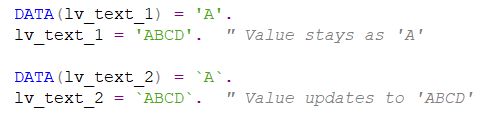
DATA(lv_text_1) = 'A'.    " typed as C(1) — fixed-length char
DATA(lv_text_2) = `A`.    " typed as STRING

lv_text_1 = 'ABCD'.       " only 'A' is stored (truncated to length 1)
lv_text_2 = `ABCD`.       " 'ABCD' is stored in full
lv_text_1is typed asC(1)because the initial value'A'is in single quotes. So even when you assign'ABCD', it only keeps the first character. If the initial value length is 2, the variable length also remains 2.lv_text_2is typed asSTRINGbecause of the backticks, so it can hold the full value.
Tip: Use backticks when you need to store a full string. Single quotes will create a fixed-length character field based on the length of the initial value.
This post is licensed under CC BY 4.0 by the author.