Display RAP Actions in the Footer Using Determining Actions
Learn how to display RAP actions in the Fiori Object Page footer using determining actions and the @UI.identification determining: true annotation.
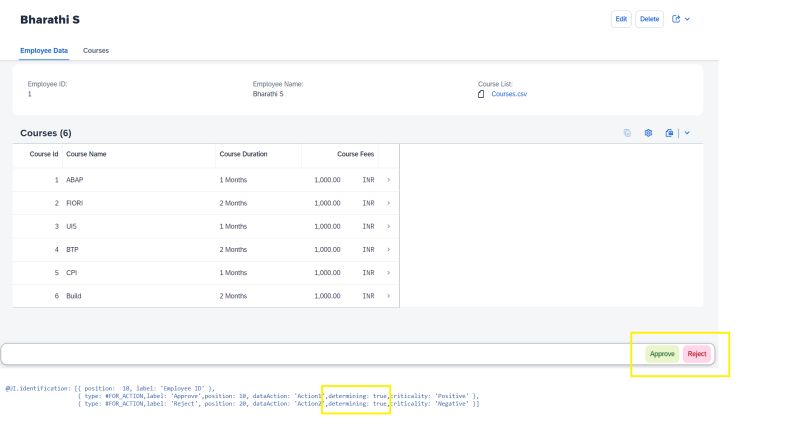
Want to display your RAP actions in the footer? Consider using determining actions.
Determining actions allow you to trigger specific actions directly from the object page, typically used for process-related tasks like “Approve” or “Reject.” These actions appear as buttons in the footer of the object page. This only works with the @UI.identification annotation with the keyword determining: true.
@UI.identification: [
  {
    type:        #FOR_ACTION,
    dataAction:  'approveRequest',
    label:       'Approve',
    determining: true,
    criticality: 'ApproveButtonCriticality'
  },
  {
    type:        #FOR_ACTION,
    dataAction:  'rejectRequest',
    label:       'Reject',
    determining: true,
    criticality: 'RejectButtonCriticality'
  }
]
element;
Note: In this example, two additional elements (
ApproveButtonCriticalityandRejectButtonCriticality) are used to store criticality values for coloring the buttons.
This post is licensed under CC BY 4.0 by the author.