String Templates — Avoid Spaces Between Vertical Bars
Learn why you should avoid spaces between vertical bars in ABAP string templates to prevent unexpected literal characters in the output string.
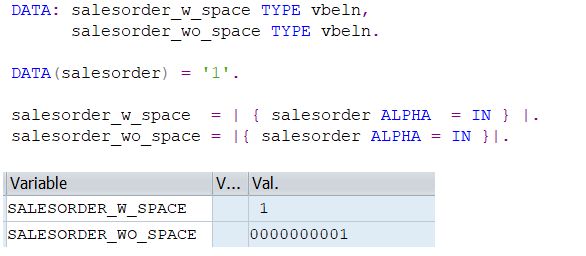
We often use string templates (| |) to add or remove leading zeros and perform various string operations. However, it’s important to note that you should not leave any spaces between the two vertical bars, as this can sometimes produce unexpected results.
For example, the following snippets can produce different results:
1
2
3
4
5
" Without space — correct
DATA(lv_result1) = |{ lv_value ALPHA = IN }|.

" With space — may produce unexpected results
DATA(lv_result2) = | { lv_value ALPHA = IN } |.
In the second example, the extra spaces inside the template are treated as literal characters and become part of the resulting string, leading to values that don’t match what you intended.
This post is licensed under CC BY 4.0 by the author.