Using Radio Buttons Instead of Dropdowns in RAP
How to display a value help as radio buttons in SAP Fiori RAP using the Common.ValueListWithFixedValues and ValueListShowValuesImmediately annotations.
Using Radio Buttons Instead of Dropdowns in RAP
Add the following annotations in your project’s webapp/annotations/annotation.xml file.
1
2
3
4
5
6
7
8
9
10
11
12
13
14
15
16
17
18
19
20
21
22
23
24
<Annotations Target="SAP__self.RootType/CriticalityCode">
    <Annotation Term="Common.ValueListWithFixedValues" Bool="true">
        <Annotation Term="Common.ValueListShowValuesImmediately" Bool="true"/>
    </Annotation>
    <Annotation Term="Common.ValueList">
        <Record Type="Common.ValueListType">
            <!-- Value Help entity exposed in the Service Definition -->
            <PropertyValue Property="CollectionPath" String="Criticality"/>
            <PropertyValue Property="Parameters">
                <Collection>
                    <Record Type="Common.ValueListParameterInOut">
                        <!-- Field on the RAP Object Page -->
                        <PropertyValue Property="LocalDataProperty"
                                       PropertyPath="CriticalityCode"/>
                        <!-- Corresponding field in the Value Help entity -->
                        <PropertyValue Property="ValueListProperty"
                                       String="Code"/>
                    </Record>
                </Collection>
            </PropertyValue>

        </Record>
    </Annotation>
</Annotations>
Annotation Details
| Annotation | Description |
|---|---|
| Common.ValueListWithFixedValues | Indicates that the value help contains a fixed list of values. |
| Common.ValueListShowValuesImmediately | Displays the fixed values directly as radio buttons instead of opening a value help dialog. |
| CollectionPath | Specifies the value help entity exposed in the Service Definition. |
| LocalDataProperty | The field on the RAP Object Page that stores the selected value. |
| ValueListProperty | The corresponding field in the value help entity whose value is written back to the local field. |
Display Radio Buttons Horizontally
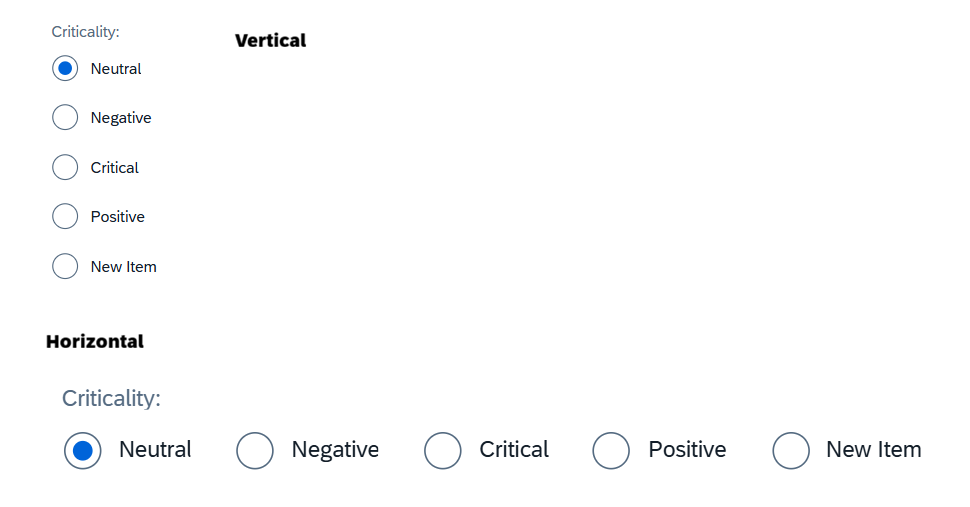
By default, radio buttons are displayed vertically. To render them horizontally, add the following configuration in the manifest.json.
1
2
3
4
5
6
7
8
9
10
11
12
13
14
{
  "controlConfiguration": {
    "@com.sap.vocabularies.UI.v1.FieldGroup#Qualifier": {
      "fields": {
        "DataField::CriticalityCode": {
          "formatOptions": {
            "fieldEditStyle": "RadioButtons",
            "radioButtonsHorizontalLayout": true
          }
        }
      }
    }
  }
}
Configuration Details
| Property | Description | |———-|————-| | fieldEditStyle | Renders the field as Radio Buttons instead of the default dropdown/value help. | | radioButtonsHorizontalLayout | When set to true, displays the radio buttons horizontally. If omitted or set to false, they are displayed vertically. |
Result
By using these annotations:
- The fixed value help is rendered as radio buttons.
- Users can select only one option.
- A determination or get defaults can be used to set the default value.
- Users cannot clear the selected value.
- No additional validation is required to ensure a value is selected.
This post is licensed under CC BY 4.0 by the author.