Dynamic Semantic Navigation in CDS
Learn how to implement dynamic semantic navigation in CDS by conditionally showing fields with separate semantic object annotations per type.
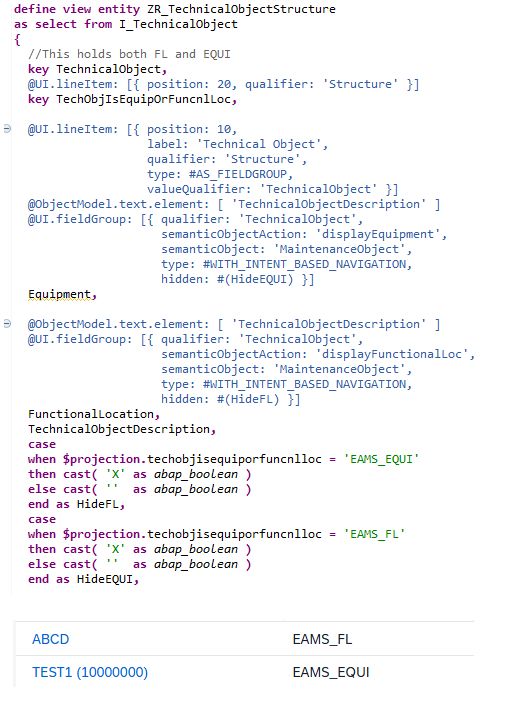
I recently encountered a scenario where I needed to navigate to different apps based on the type of a technical object — Functional Location or Equipment. Since CDS doesn’t support dynamic semantic object/action assignment, I implemented a workaround by grouping two fields into a single column, each configured with its own semantic object and action. Based on the object type, I conditionally hide one of the fields.
For example:
- If the object type is Equipment, the column shows a link that navigates to the Equipment app.
- If it’s Functional Location, it shows a link to the Functional Location app.
@UI.lineItem: [
  { position: 10, label: 'Technical Object' },

  " Field for Equipment navigation — hidden when not Equipment
  { type: #WITH_URL,
    url: EquipmentSemanticUrl,
    hidden: #( CASE ObjectType WHEN 'E' THEN '' ELSE 'X' END ) },

  " Field for Functional Location navigation — hidden when not FL
  { type: #WITH_URL,
    url: FuncLocSemanticUrl,
    hidden: #( CASE ObjectType WHEN 'F' THEN '' ELSE 'X' END ) }
]
Each field is annotated with its own @Consumption.semanticObject and @Consumption.semanticObjectAction, pointing to the respective app. Based on the ObjectType value, exactly one field is visible at a time — effectively giving dynamic navigation within a single column.